
The Note is used to make a quick note and put it somewhere in your schematics to document the working of your app.
Properties
Find more information about changing properties here: "Properties Viewer"Header
type: See descriptionThe header of the note, which is printed on top of the note using the font as specified in HeaderFont.
Font
type: Known text font nameThe font of the text (select from the Font repository).
This property uses the Font Repository. For more information about the use of text fonts in a project, refer to "Font Repository"
HeaderFont
type: Known text font nameThe font of the header (select from the Font repository).
This property uses the Font Repository. For more information about the use of text fonts in a project, refer to "Font Repository"
BackgroundColor
type: Known color nameThe background color of the text panel
This property uses the Color Repository. For more information about the use of colors in a project, refer to "Color Repository"
TextColor
type: Known color nameThe text color
This property uses the Color Repository. For more information about the use of colors in a project, refer to "Color Repository"
Size
type: Size containing width and heightThe size of the user interface of this object (width, height).
Coordinates
type: CoordinateThe location of the user interface of this object in (x,y) coordinates, relative to the object it is on top of.
Caption
type: Word or phraseThe name of the object in the project. This name must not contain '.', '$' nor '@' characters.
For more information about the rules and usage of the Caption property, please refer to "Caption property - background and usage".
Documentation
type: See descriptionOptional documentation of this object. If this object is an operator, the Documentation text is displayed below the operator symbol.
Text content tab

Use the Note only to make notes on Design pages. If you require a colored text box for a user interface (on a Display page), then please use the Static Text object.
Any variables (enclosed in $ characters) are translated in the contents of that variable. If you want to show the variable name itself, then enclose the variable name in double $$ characters. Variables in a Note are not updated in real time; new content of a variable is only displayed after the next screen update.
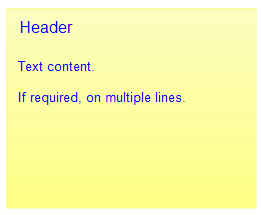
Example note