
Notes ("Note") are objects that are used to make quick notes and put them somewhere in your schematics to document the working of your app.
The Notes Navigator helps you find the notes in your project, by displaying the Header of each note. Click on the name to jump to the note.
The note is then shown near the "Navigation Arrow".
User Interface
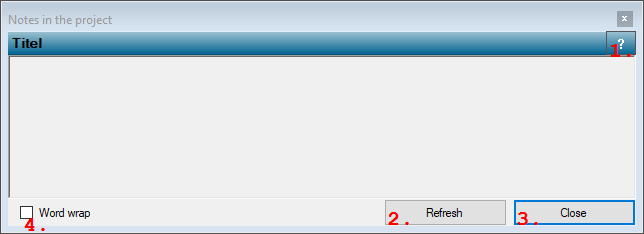
1. Open Help button
Opens the help document for this dialog.2. Refresh contents
Clears the text viewer and refreshes its contents. Depending on the contents, the refresh may take a few moments.3. Close
Closes this dialog.4. Word wrap check box
Check this check box to wrap long text lines to the next line, so that no horizontal scrolling is necessary.Note that the Header property of the note is shown, not the Caption!